



Downloading your W-2 Tax Forms
TO DOWNLOAD YOUR W-2, YOU WILL NEED:
- Employee Number – If you are a former LACOSTA team member and do not remember your employee number, please email [email protected]. Inactive team members will still have access to eHUB, even after termination.
- eHUB Password – If you do not remember your ehub password use the “Forgot Password” link in the ehub log-in page to reset your password.
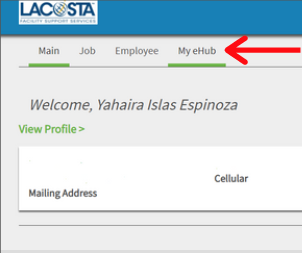
ONCE LOGGED INTO EHUB, GO TO THE “MY EHUB” TAB.
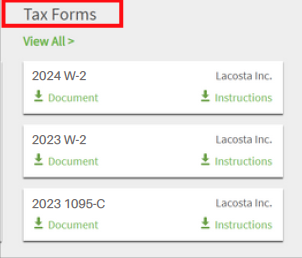
IN THE “MY EHUB” TAB, FIND THE TAX FORMS WIDGET.

FIND THE 2025 W-2, AND CLICK THE DOWLOAD LINK.
If you have trouble retrieving your W2 from eHUB, please email [email protected] and provide the following information:
- Full Name
- Employee Number (if available)
- Last 4 digits of their social security number
HAVE QUESTIONS?
Please contact one of our payroll representatives at:
224-457-2209
or email [email protected]